


 EN
EN DE
DEBianlian Ransomware: Critical Insights & Rapid Recovery Solutions
Bianlian Ransomware strikes fast, locking down data and demanding ransoms from businesses of every size. See how it functions, examine actual attack examples, and let our team guide your recovery and data restoration process.
Did you get hit by Bianlian ransomware? Don’t panic. We’re here to help. This page contains information and statistics about Bianlian ransomware decryption, removal, and recovery. Read on to find out more, or get in touch with us now and for a FREE assessment of your situation.
What is Bianlian Ransomware?
The Bianlian ransomware started gaining visibility in 2022, proving their ability to effectively exploit security vulnerabilities and encrypt data.
Bianlian quickly made a shift in a lot of cases to extortion for data leaks instead of encrypting data.

Rapid Encryption
One of the fastest ransomware encryption speeds, making attacks harder to stop.
Encryption of Network Shares
Encrypts files across shared drives and servers to maximize operational disruption.
Disables Backups
Actively seeks and deletes backups to prevent easy recovery after encryption.
Why You Shouldn’t Attempt to Fix It Alone
If Bianlian ransomware has hit your business, taking the wrong steps can cause permanent data
loss or legal risks. Like a crime scene, a ransomware attack must be preserved—tampering
with encrypted files, attempting self-recovery, or engaging with attackers can destroy
critical evidence and reduce your chances of recovery.
The right response in the first moments after a Bianlian attack can make the difference
between full recovery and permanent data loss. Follow these critical steps to protect your
data and maximize your chances of restoring operations.
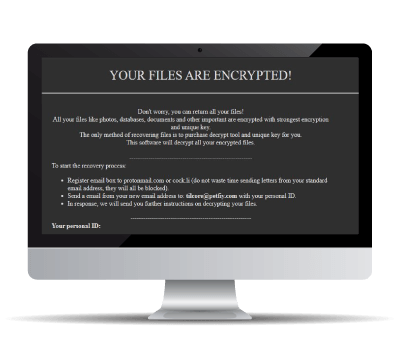
If you find a “ReadMe” note on your system showing information like the above, you’ve likely suffered a Bianlian Ransomware attack.
Never try to change or recover the data.

What should I do when my data has been encrypted by Bianlian Ransomware?
If you’ve fallen victim to ransomware, follow these crucial steps:
Request 24/7 Ransomware Recovery Help
Get expert guidance to assess, contain, and recover safely.
Isolate Infected Systems
Disconnect infected devices to stop the spread. Avoid self-recovery.
Preserve Evidence Immediately
Keep ransom notes & logs. Do not restart or modify anything.
Bianlian ransomware statistics & facts
RANSOM AMOUNTS
Diverse groups use Bianlian ransomware, so ransom amounts may vary.
The average Bianlian ransom amount is somewhere between $100,000 – $350,000. If you purchase Bitcoin to pay this, you will need to add 10% to cover the quick-buy method fees if you are purchasing with a credit card or PayPal on an exchange.
AVERAGE LENGTH
The Bianlian ransomware downtime can we longer than average ransomware incidents. This is because most Bianlian attackers use a chat interface or email to communicate and there is no automated way to make a payment.
Depending on your company size and how often you use IT-systems in your daily business, this is the most expensive part of this incident. Additional to the unavailability of your IT-systems, this is damaging your company reputation.
Your goal should be to get your systems back to a productive state as soon as possible. The best way to do this is to call in experts, which have a vast knowledge of Bianlian ransomware and get the IT-systems back up running.
CASE OUTCOMES
There is a high chance of getting a working Bianlian decryptor after paying the attackers. But there’s never a guarantee.
Some attackers have a good reputation for providing working Bianlian decryptors. Others are known scammers and will never provide one.
COMMON ATTACK VECTORS
The most common attack vector for Bianlian ransomware is spam emails and contagious webpages.

How to identify Bianlian ransomware
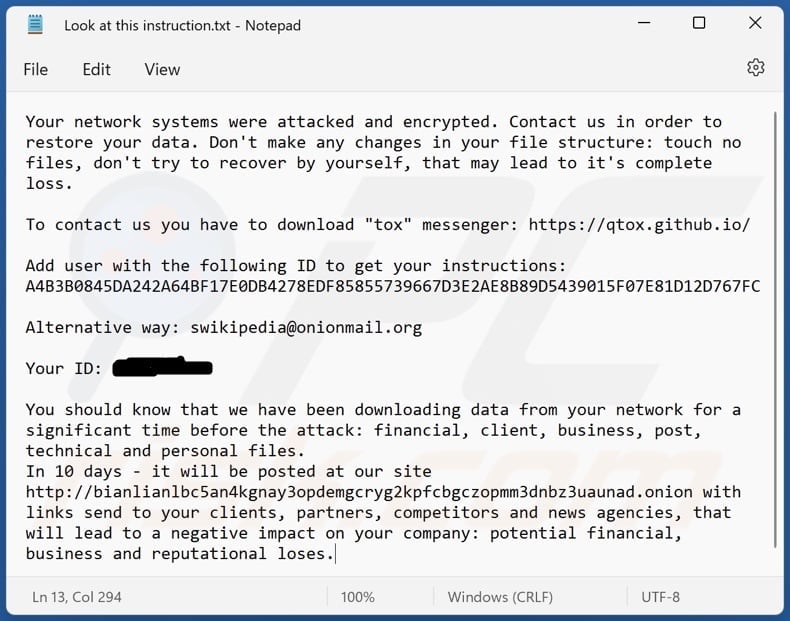
This is an average Bianlian ransomware note. (With slight redaction in the interest of public safety)
Typical screenshots of Bianlian ransomware attacks
Frequently asked questions
Decryption depends on the ransomware variant. In some cases, publicly available decryption tools exist, but not all attacks have a known solution. You can submit a free ransomware recovery request, and we will check for possible decryption methods.
In most cases involving personal data, which applies to nearly every ransomware incident, reporting is legally required. In the EU, GDPR requires notification to the relevant data protection authority within 72 hours of becoming aware of a personal data breach. The UK ICO requires the same 72-hour window. In the US, HIPAA-covered entities have 60 days to notify affected individuals (and immediately for breaches affecting 500+ people). The clock starts from awareness of the incident, not from a full technical understanding.
In most jurisdictions, paying a ransom is not illegal in itself — but it can become illegal if the payment ends up going to a sanctioned entity or country (OFAC-designated groups in the US, EU sanctions lists, UK Treasury lists). Before any payment, sanctions screening is essential. BeforeCrypt handles this compliance layer as a standard part of every engagement.
Most established ransomware groups do provide working decryption tools when paid — the business model depends on their reputation for delivery. However, decryptors are often slow, incomplete, or corrupt a percentage of files during recovery. This is where working with a specialist matters: BeforeCrypt tracks the delivery reliability of specific groups, negotiates sample-file decryption as proof of capability where the group allows it, and plans realistic recovery timelines based on our own engagement history with each group.
Most modern ransomware groups follow through on publication threats — stolen data appears on the group's leak site, is often mirrored to Telegram and dark web forums, and may be sold to third parties. Recovery becomes limited to whatever you can rebuild from backups.
Backups protect against file loss but not against data theft. Most modern ransomware groups exfiltrate sensitive data BEFORE encryption and threaten to publish it regardless of your recovery capability. This is why leak-site publication and negotiation still matter even for organisations with clean, offline backups — and why "we can just restore from backup" rarely tells the full story.
In most jurisdictions, yes — reporting is a standard part of a ransomware incident and, in some cases, legally required. In the US, that means the FBI (via IC3 or a local field office) and CISA. In the EU, national CERT and cybercrime units. Reporting does not obligate you to any specific recovery path but does open access to threat intelligence and, occasionally, decryption tools recovered by law enforcement.
Yes. We’ve handled 1,700+ incidents across ransomware, BEC and data-leak extortion. We identify the variant, decide decrypt vs. clean verified restore, and guide a controlled return to operations. When needed, we support negotiation & compliance—always legally and with a clear audit trail.
Yes. We produce insurer-ready incident reports with a defensible timeline, scope, likely entry path, exfiltration assessment, actions taken, and chain-of-custody. We can join the adjuster call, map our findings to your carrier’s forms, and provide GDPR/NIS2 notifications where required. Final acceptance always depends on the policy and carrier, but our packages are designed to speed up approvals and reduce back-and-forth.
MSPs keep IT running; they’re not built for evidence handling and incident triage. Insurer panels optimize claims, not necessarily speed & clarity for your business. We work alongside both: kick off in ≤2h, run forensic triage with chain-of-custody, coordinate safe containment, and deliver executive- and insurer-ready findings—without taking your environment hostage.
Because it turns chaos into fast, safe recovery. We cut downtime and limit damage while preserving evidence. Within ≤48h you get a forensic triage pack (timeline, likely entry path, scope, decrypt-vs-clean-restore decision, go-live criteria) so leadership can act with confidence. Result: controlled, verified restart—not guesswork.